Showing posts with label internet explorer. Show all posts
I loved firefox for its features, ease of use, keyboard shortcuts etc etc. I am sure you appreciate firefox too. I use it a lot with about 8+ tabs opened everytime. But I honestly was not happy with the time it takes to load and I decided to search on the internet if there is any browser that is fast just for a backup to firefox.

And I found K-meleon. This is a open source and absolutely free. People on internet said it is fast and best browser out there and they said it right.
It definitely is very fast, opens up and loads websites in a blink of an eye. I just cant say enough how fast it does things, you gotta try. I wanted to have this as a backup but it replaced my firefox totally. 

Take a look at screen shot. I customised the appereance, hid all the toolbars, menubar, bookmarks etc etc. Just so I can have more room for the page. I can access all the options using keyboard shortcuts anyway. This broswer can fit a lot of tabs than firefox.

You wanna try, here is the direct download.


Check out its speed in the video. Both firefox and k-meleon are compared with about 8 tabs. If k-meleon were to be loaded with no tabs at all it just loads in no time, its like a dry leaf, very light weight.


Posted by Freeman On 8:36 PM 0 comments
Stumble ThisFav This With TechnoratiAdd To Del.icio.usDigg ThisAdd To RedditAdd To FacebookAdd To Yahoo
There are many mp3 players out there for your blog/website like xspf player, flourish player, mixpod etc etc. Some work in firefox only, some work in both firefox and internet explorer but don't playlist. Anyway, with this post you'll be able to setup a working mp3 player for your website/blog.

1.First, you'll need a file hosting service, where you can store files(mp3 files in this case).
There are many free file hosting services out there. I will go with  www.skydrive.live.com
Capacity: 25GB
Max upload size: 50MB
Sign in to www.skydrive.live.com with your msn, hotmail or any live ID and upload your mp3 files into your public folder.

2.Right click on this link and save link as/save target as and save it to your PC...  PLAYER_MP3_MULTI.SWF and then upload it to your skydrive public folder.

3.We need permanent links for your files in skydrive so they're accessible over the internet all the time through the same links.

4.Now, as with the most of the file hosting services skydrive doesn't give out a permanent link for a file, so a file which is accesible through a link today may not be accessible tomorrow through the same link.
But don't worry! Thanks to Tim Acheson, he found a solution for us. Go ahead and get your permanent links to your files HERE
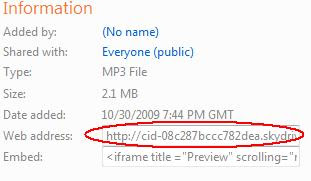


NOTE: You have to encode your link to use with Tim Acheson's API. From your skydrive copy the "web address." as shown in the figure and go to this SITE TO ENCODE .


5. You now have the permanent links for your mp3 player and your mp3 files.
  • Sign into your blog and click on customize at top right corner 
  • Click on "Add a gadget", that opens a window, in that look for HTML/JavaScript and click on it.
  • Title: mp3 player, in "Content" copy and paste the following code:  


  • <object data="http://yoursite.com/player_mp3_multi.swf" 
    width="200" height="100" type="application/x-shockwave-flash">
        <param value="http://yoursite.com/player_mp3_multi.swf" 
                         name="movie"/>
        <param value="#ffffff" name="bgcolor"/>
        <param value="mp3=http://yoursite.com/song1.mp3 | 
    http://yoursite.com/song2.mp3&amp;title=song1 | song2 
    &amp;autoplay=0&amp;showvolume=1" name="FlashVars"/>
    </object>


  • In the above code, replace the  "http://yoursite.com/player_mp3_multi.swf" and "http://yoursite.com/song1.mp3" with your actual permanent links of your mp3 player and your mp3 files.
  • Click on save button and you're done
This mp3 player both in firefox and internet explorer, unlike xspf player or any others I tried and  it is tiny and simple. I have this working mp3 player in my blog-footer, you should be able to have one too.
Posted by Freeman On 12:31 PM 3 comments
Stumble ThisFav This With TechnoratiAdd To Del.icio.usDigg ThisAdd To RedditAdd To FacebookAdd To Yahoo

Blog Archive

Related Posts with Thumbnails

counter

HTML hit counter - Quick-counter.net
Copyright 2009 - tips .. come on in. Protected by Copyscape plagiarism checker - duplicate content and unique article detection software. Designed by Gaganpreet Singh